Table of Contents
- Overview
- Before You Begin
- Picture-Based Procedure
- Connect the SunSaver LOAD Output to the DFB
- 1. Locate the SunSaver LOAD terminals
- 2. Remove both wires from the SunSaver LOAD terminals
- 3. Confirm the wires are removed
- 4. Remove the barrel-connector tip
- 5. Strip the conductors
- 6. Remove the DFB power connector
- 7. Insert the two wires into the Phoenix connector
- 8. Reconnect both wires to the LOAD terminals
- 9. Check polarity with a multimeter
- 10. Correct reversed polarity
- 11. Reconnect the Phoenix connector
- 12. Confirm startup
- Verification Checklist
- Troubleshooting
DFB Solar Power Connection Using the SunSaver LOAD Output
Connect SunSaver controller to DFB sign via barrel connector. Cut connector, strip wires, insert into green Phoenix connector, verify polarity, then reconnect.

Table of Contents
- Overview
- Before You Begin
- Picture-Based Procedure
- Connect the SunSaver LOAD Output to the DFB
- 1. Locate the SunSaver LOAD terminals
- 2. Remove both wires from the SunSaver LOAD terminals
- 3. Confirm the wires are removed
- 4. Remove the barrel-connector tip
- 5. Strip the conductors
- 6. Remove the DFB power connector
- 7. Insert the two wires into the Phoenix connector
- 8. Reconnect both wires to the LOAD terminals
- 9. Check polarity with a multimeter
- 10. Correct reversed polarity
- 11. Reconnect the Phoenix connector
- 12. Confirm startup
- Verification Checklist
- Troubleshooting
- Overview
- Before You Begin
- Picture-Based Procedure
- Connect the SunSaver LOAD Output to the DFB
- 1. Locate the SunSaver LOAD terminals
- 2. Remove both wires from the SunSaver LOAD terminals
- 3. Confirm the wires are removed
- 4. Remove the barrel-connector tip
- 5. Strip the conductors
- 6. Remove the DFB power connector
- 7. Insert the two wires into the Phoenix connector
- 8. Reconnect both wires to the LOAD terminals
- 9. Check polarity with a multimeter
- 10. Correct reversed polarity
- 11. Reconnect the Phoenix connector
- 12. Confirm startup
- Verification Checklist
- Troubleshooting

There is a -M at the end of the model number for MUTCD compliant rings
Overview
Use this guide to connect the SunSaver controller in a battery box to a DFB sign when the available two-wire lead terminates in a barrel connector.
The procedure covers two things:
- The typical SunSaver layout shown in the supplied battery-box wiring reference.
- The field connection procedure for cutting the barrel-connector tip, landing the two conductors in the DFB's green Phoenix connector, and verifying polarity before reconnecting the sign.
The SunSaver controller and DFB sign are separate components during this procedure. Confirm the exact sign model, controller model, production revision, and approved wiring drawing before using this procedure on a different configuration.
Before You Begin
WARNING
- Remove both wires from the SunSaver
LOADterminals before cutting or stripping any wire. - Do not reconnect the green Phoenix connector to the DFB until polarity has been checked.
- Complete the work only under the site's approved electrical and lockout procedures.
Required items
- DFB sign with the green Phoenix power connector
- Separate battery box with the SunSaver controller
- Barrel-connector power lead
- Wire cutters
- Wire stripper
- Multimeter
Picture-Based Procedure
Use the numbered visual for orientation. The written procedure and polarity check below are the authoritative instructions.
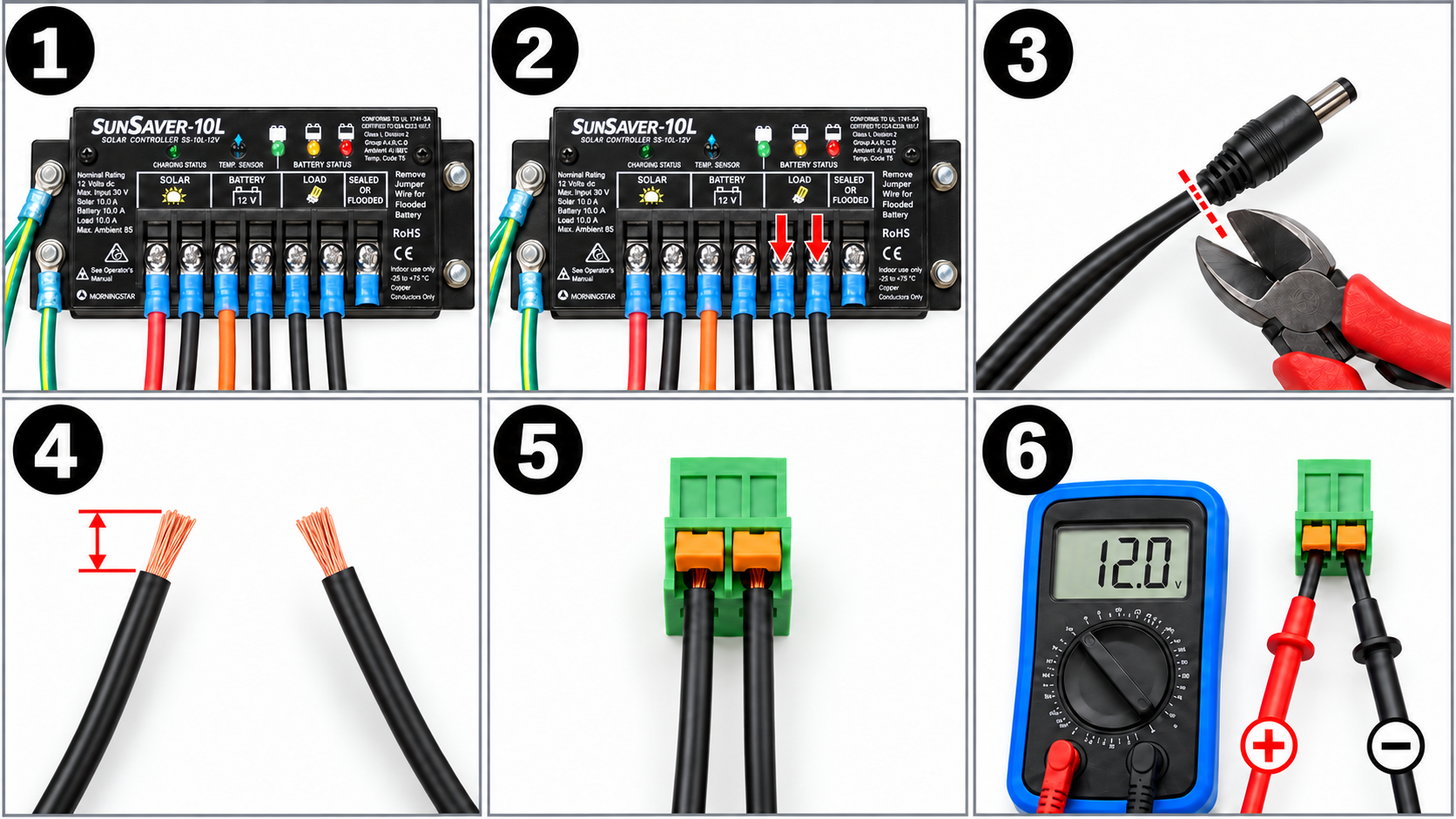
Connect the SunSaver LOAD Output to the DFB
1. Locate the SunSaver LOAD terminals
Open the separate battery box and locate the SunSaver controller. Identify the LOAD terminals on the right-hand side of the controller.
2. Remove both wires from the SunSaver LOAD terminals
Remove both wires from the SunSaver LOAD terminals. These are the two black wires used for the DFB power connection.
3. Confirm the wires are removed
Make sure both wires have been removed from the SunSaver LOAD terminals before proceeding to the next step.
WARNING
Do not cut the barrel connector while either wire is still connected to the SunSaver LOAD terminals.
4. Remove the barrel-connector tip
Use wire cutters to cut off the barrel-connector tip at the end of the two-wire lead. Separate approximately 4 inches of the two black wire strands.
5. Strip the conductors
Strip approximately 1/4 inch of insulation from each black wire.
Do not identify positive or negative by wire color. Both wires are black; polarity is determined with the multimeter in Step 9. [M03]
6. Remove the DFB power connector
Remove the green Phoenix connector for power from the DFB.
7. Insert the two wires into the Phoenix connector
Depress the orange tab on the Phoenix connector and insert one wire into each terminal position.
Do not connect the Phoenix connector back to the DFB yet.
8. Reconnect both wires to the LOAD terminals
Reconnect both wires inside the battery box to the SunSaver LOAD terminals.
9. Check polarity with a multimeter
Use a multimeter to check the polarity of the wires in the Phoenix connector.
The required orientation is:
- Positive: left terminal
- Negative: right terminal
10. Correct reversed polarity
If the polarity is backwards, remove both wires from the Phoenix connector and switch their positions on the terminals.
Recheck polarity before reconnecting the connector to the DFB.
11. Reconnect the Phoenix connector
Plug the Phoenix connector back into the DFB sign.
12. Confirm startup
If the polarity is correct, the sign should boot as normal.
Verification Checklist
- Both wires were removed from the SunSaver
LOADterminals before the barrel-connector tip was cut. - The barrel-connector tip was cut off at the end of the lead.
- Approximately 4 inches of the two conductors were separated.
- Approximately 1/4 inch of insulation was removed from each conductor.
- The Phoenix connector is fully seated on the DFB power input.
- Positive is on the left terminal.
- Negative is on the right terminal.
- The sign boots normally after reconnection.
Troubleshooting
The sign does not boot after reconnection
- Disconnect the Phoenix connector from the DFB.
- Recheck the polarity at the Phoenix connector.
- Confirm that the positive conductor is on the left and the negative conductor is on the right.
- Confirm that both wires are connected to the SunSaver
LOADside. - If the sign still does not boot, stop and verify the model-specific wiring and power requirements before continuing.
Polarity is reversed
Disconnect the connector, remove both conductors, switch their positions, and verify polarity again before reconnecting the Phoenix connector to the DFB.
Was this helpful?
Programming DFB 2.0 signs with Pelco One App